 Tyger Pool
Non-custodial DATUM pool
Tyger PoolNon-custodial DATUM pool
Paid directly from the coinbase. When Tyger Pool finds a block, the coinbase transaction pays you your share directly to your own address. There is no pool wallet, no balance we hold, no withdrawal, nothing to trust. We never have custody of your rewards, and you can verify every payout yourself on any explorer.
Built on DATUM, so your own node builds your blocks too. Your money and your blocks stay yours from end to end.
0% fee and setup is a few minutes' clicking whether you're a veteran or a complete beginner.
since 7 Sep 2026 · verify independently
When you're done: your Umbrel builds your blocks, your miners point at it, and every block pays your address directly. About 5 minutes.
You need:
a) Umbrel with the Bitcoin Knots app installed and synced (BLAKE2b version, 29.4 or newer — the one in Umbrel's own app store)
b) your payout address (a bc1… address from your BLAKE2b wallet)
c) your own miners, or rented hash
Step 1
Umbrel home → App Store → ⋯ menu (top right) → Community App Stores → paste: https://github.com/tygerpool/umbrel-store → Add
Step 2
Open the Tyger Pool store → Tyger DATUM → Install → wait for Open
Step 3
Open the app → sign in (right-click the app icon on the Umbrel home screen → Show default credentials)
Step 4
Config tab → pool_address → paste your bc1… address between the quotes → Save
(Safari can't edit this page — use Chrome or Firefox)
(Pool mode is live — every block the whole pool finds pays you your share. Not yet tested by us on a real Umbrel — first tester welcome; tell #getting-started how it went.)
How will you mine?
Step 1
Umbrel → Settings → note its address (192.168.1.xx)
Step 2
Miner's web page → pool settings →
a) URL: stratum+tcp://YOUR-UMBREL-IP:23341
b) Worker: rig1 (a label only — rig2, rig3 for the others)
c) Password: x
→ Save / Apply. Repeat for each miner.
Rented rigs must be pointed at your gateway. You'll need to: a) open one port on your router, then b) paste a few details into your hash broker (we use MiningRigRentals — the steps below are for it; other brokers ask for the same details).
Steps:
Part A — open one port on your router
(skip this on a cloud server)
(This tells your router to pass mining traffic through to the machine running your gateway.)
Step 1
Router's admin page → address is on the router's sticker (usually 192.168.1.1 or 192.168.0.1) → open it in a browser → log in (password on the sticker unless you changed it)
Step 2
Find Port Forwarding (sometimes under Advanced, NAT, Virtual Server or Applications & Gaming)
Step 3
Add a rule:
a) Name: Tyger
b) Protocol: TCP
c) External port: 23341
d) Internal IP: the address of your Umbrel (the 192.168… one from My own miners)
e) Internal port: 23341
→ Save
Step 4
Check it worked: https://canyouseeme.org → enter 23341 → Check → it should say Success
(Error? Some connections can't do this — Starlink, most mobile broadband, some fibre. Use a cloud server instead: Linux tab → No — install one for me → On a cheap cloud server. Ask in Discord if unsure.)
Part B — find your public address
(the address the outside world sees you at)
Step 1
Open https://ifconfig.me → note the number shown (on a cloud server it's simply the server's IP)
Part C — set up the broker and rent
(MiningRigRentals shown)
Step 1https://www.miningrigrentals.com → sign in → account menu → Pools → Add Pool →
a) Name: Tyger Pool
b) Algorithm: Blake2b (Sia)
c) Host: your public address
d) Port: 23341
e) Worker: rented
f) Password: x
→ Save
Step 2
Rigs → filter Blake2b → pick a rig (price per TH/s per day is shown) → Rent → choose hours → select Tyger Pool → confirm
Step 3
Within a few minutes the rig shows as connected on the broker's page. It is now mining through your node, paid to your address.
(Don't rent until your node is fully synced — a rig pointed at a gateway that isn't ready earns nothing.)
(Renting isn't automatically profitable — compare the rig's price with what a block pays before you commit. Ask in Discord if unsure.)
a) Refresh this page — Gateways connected goes up by one. That's you.
b) Your gateway's dashboard (Linux/Windows/Mac: http://127.0.0.1:7152 on that machine; Umbrel: the app's page) shows Connected; your miners appear with a hashrate once pointed at it.
c) When the pool finds a block, your share is paid in that block, straight to your address — it unlocks after a 45-day maturity period (a staged, community-agreed soft fork that recently replaced the old 100-block rule and may be extended by later stages; a chain rule, same for everyone).
That's it. Your blocks, your coins.
Still stuck? Click the 🐯 for an instant answer, or Discord → #getting-started — paste what you see. No stupid questions.
When you're done: a small program (the gateway) on this computer builds your blocks, your miners point at it, and every block pays your address directly.
Do you already run a Bitcoin (BLAKE2b) node on this computer?
You need:
a) your node running
b) your payout address (a bc1… address from your BLAKE2b wallet)
c) your own miners, or rented hash
How do you want to install it?
Step 1
Open a terminal (Mint: the black-square icon in the taskbar, or Ctrl + Alt + T)
Step 2
Paste, Enter:
cd ~ && wget -q https://tygerpool.com/setup-tyger-datum.sh && bash setup-tyger-datum.sh
(Works on Ubuntu, Debian and Mint, plus Fedora, Arch and openSUSE — on anything else, use the "By hand" steps instead)
Step 3
Answer three questions:
a) cookie file — press Enter if it found your fork node (if it guessed a different node, type n and give the right path — the file is called .cookie, inside your node's data folder, usually /home/YOUR-USERNAME/.bitcoin/. If your node uses a username and password instead, just press Enter here and it asks for those — they're in your node's bitcoin.conf file)
b) RPC port — Enter (type yours only if you changed it from 8332)
c) payout address — paste your bc1… address, Enter
Step 4
Wait for the green tick (a few minutes; it prints your miner address and a dashboard link. Close the terminal if you like — it keeps running and restarts by itself after a reboot)
(Anything red? Copy the whole terminal into Discord. Nothing here can touch your coins — the gateway only reads your node.)
→ Part 2 — connect your miners or rented hash (below)
Step 1
Install the gateway — paste one at a time, Enter after each:
sudo apt update
sudo apt install -y git cmake pkg-config build-essential libcurl4-openssl-dev libjansson-dev libsodium-dev libmicrohttpd-dev psmisc
git clone https://github.com/innerhat-dev/datum_gateway ~/tyger-datum/datum_gateway
cd ~/tyger-datum/datum_gateway && git checkout 4cd17a062d53285c5b48ce87e10f2d85930154e5 && cmake -B build -DCMAKE_BUILD_TYPE=Release && cmake --build build -j$(nproc)
(the last one takes a few minutes and ends with "Built target datum_gateway")
Step 2
Get the config file — paste:
wget -q https://tygerpool.com/tyger-datum-config.json -O ~/tyger-datum/tyger-datum-config.json && xdg-open ~/tyger-datum/tyger-datum-config.json
Step 3
Change three lines, save, close:
a) pool_address → your bc1… address inside the quotes
b) rpccookiefile → change YOUR_USERNAME to your Linux username (the word at the start of your terminal line)
c) rpcurl → leave it unless your node uses a port other than 8332
(Leave the pool_… lines alone. Node uses a password instead of a cookie? Replace the rpccookiefile line with "rpcuser": "…", "rpcpassword": "…")
Step 4
Start it — paste:
~/tyger-datum/datum_gateway/build/datum_gateway -c ~/tyger-datum/tyger-datum-config.json
("Handshake response received" = connected. Leave the terminal open.)
Step 5 (optional)
Start by itself after a reboot — paste the three lines, one at a time:
sudo bash -c 'printf "[Unit]\nDescription=Tyger DATUM Gateway\nAfter=network-online.target\n[Service]\nExecStart=%s/tyger-datum/datum_gateway/build/datum_gateway -c %s/tyger-datum/tyger-datum-config.json\nRestart=always\nUser=%s\n[Install]\nWantedBy=multi-user.target\n" "$HOME" "$HOME" "$USER" > /etc/systemd/system/tyger-datum.service'
sudo systemctl enable --now tyger-datum
systemctl status tyger-datum --no-pager
("active (running)" = done)
→ Part 2 — connect your miners or rented hash (below)
Where do you want it to run?
(15 minutes, then 1–3 days while the node catches up)
You need:
a) about 40 GB free disk; the computer stays on
b) your payout address (a bc1… address from your BLAKE2b wallet)
c) your own miners, or rented hash
Step 1
Open a terminal (Mint: the black-square icon in the taskbar, or Ctrl + Alt + T)
Step 2
Paste, Enter (it asks for your computer's password once — nothing shows while you type):
cd ~ && curl -fsSO https://tygerpool.com/tyger-install.sh && bash tyger-install.sh
(Works on Ubuntu, Debian and Mint, plus Fedora, Arch and openSUSE — on anything else, use the "By hand" steps instead)
Step 3
Paste your payout address, Enter
Step 4
Wait for the green tick (several minutes — it installs the official Bitcoin Knots node and builds the gateway; it prints your miner address at the end)
Step 5
The node now downloads the chain — Bitcoin's whole history, 1–3 days on a home connection. Leave the computer on; the gateway goes live by itself when it finishes. Check progress — paste:
bitcoin-cli -datadir=$HOME/tyger/node getblockchaininfo | grep -e blocks -e progress
(progress near 1.0 = ready)
→ Part 2 — connect your hashrate (port 23334, machine = this computer). Point your miners now if you like — they get work automatically once the node is ready.
(15 minutes, then half a day to a day while the node catches up)
Rented rigs live on the internet, so they need to reach a gateway that has a public address. A small rented server (a "VPS") gives you exactly that, and runs your own node and gateway.
You need:
a) a VPS — Ubuntu 24.04, 2 GB RAM, 40 GB disk, about $5/month (Tyger Pool uses LunaNode; Hetzner and DigitalOcean also work. Choose Ubuntu 24.04 and note the IP address and root password it gives you)
b) your payout address (a bc1… address from your BLAKE2b wallet)
Step 1
Provider's control panel → your server → Console (or "Web console" / "Launch console") → a black window opens
(No console button? On your computer: Terminal → paste ssh root@YOUR-SERVER-IP → Enter → yes → the root password — nothing shows while you type)
Step 2
At the line ending in #, paste, Enter:
curl -fsSO https://tygerpool.com/tyger-install.sh && bash tyger-install.sh
Step 3
Paste your payout address, Enter
Step 4
Wait for the green tick (several minutes). Write down the rig address it prints — like stratum+tcp://YOUR-SERVER-IP:23334
Step 5
The node now downloads the chain — half a day to a day on a server. Close the window; it keeps running. The gateway goes live by itself when it's done. Check progress — paste:
bitcoin-cli -datadir=$HOME/tyger/node getblockchaininfo | grep -e blocks -e progress
(progress near 1.0 = ready)
→ Part 2 — connect your hashrate. On a server there's no router to open: rented hash points straight at YOUR-SERVER-IP:23334 — skip Part A of the rented-hash block.
(the cloud option costs about $5/month and is only needed if you'll use rented hash and can't open a port on your router — Starlink, most 4G. Not sure? Choose "here".)
How will you mine?
Step 1
Terminal → paste: hostname -I → the first number is this computer's address (192.168.1.xx)
Step 2
Miner's web page → pool settings →
a) URL: stratum+tcp://THIS-COMPUTER-IP:23334
b) Worker: rig1 (a label only — rig2, rig3 for the others)
c) Password: x
→ Save / Apply
Rented rigs must be pointed at your gateway. You'll need to: a) open one port on your router, then b) paste a few details into your hash broker (we use MiningRigRentals — the steps below are for it; other brokers ask for the same details).
Steps:
Part A — open one port on your router
(skip this on a cloud server)
(This tells your router to pass mining traffic through to the machine running your gateway.)
Step 1
Router's admin page → address is on the router's sticker (usually 192.168.1.1 or 192.168.0.1) → open it in a browser → log in (password on the sticker unless you changed it)
Step 2
Find Port Forwarding (sometimes under Advanced, NAT, Virtual Server or Applications & Gaming)
Step 3
Add a rule:
a) Name: Tyger
b) Protocol: TCP
c) External port: 23334
d) Internal IP: the address of this computer (the 192.168… one from My own miners)
e) Internal port: 23334
→ Save
Step 4
Check it worked: https://canyouseeme.org → enter 23334 → Check → it should say Success
(Error? Some connections can't do this — Starlink, most mobile broadband, some fibre. Use a cloud server instead: Linux tab → No — install one for me → On a cheap cloud server. Ask in Discord if unsure.)
Part B — find your public address
(the address the outside world sees you at)
Step 1
Open https://ifconfig.me → note the number shown (on a cloud server it's simply the server's IP)
Part C — set up the broker and rent
(MiningRigRentals shown)
Step 1https://www.miningrigrentals.com → sign in → account menu → Pools → Add Pool →
a) Name: Tyger Pool
b) Algorithm: Blake2b (Sia)
c) Host: your public address
d) Port: 23334
e) Worker: rented
f) Password: x
→ Save
Step 2
Rigs → filter Blake2b → pick a rig (price per TH/s per day is shown) → Rent → choose hours → select Tyger Pool → confirm
Step 3
Within a few minutes the rig shows as connected on the broker's page. It is now mining through your node, paid to your address.
(Don't rent until your node is fully synced — a rig pointed at a gateway that isn't ready earns nothing.)
(Renting isn't automatically profitable — compare the rig's price with what a block pays before you commit. Ask in Discord if unsure.)
a) Refresh this page — Gateways connected goes up by one. That's you.
b) Your gateway's dashboard (Linux/Windows/Mac: http://127.0.0.1:7152 on that machine; Umbrel: the app's page) shows Connected; your miners appear with a hashrate once pointed at it.
c) When the pool finds a block, your share is paid in that block, straight to your address — it unlocks after a 45-day maturity period (a staged, community-agreed soft fork that recently replaced the old 100-block rule and may be extended by later stages; a chain rule, same for everyone).
That's it. Your blocks, your coins.
Still stuck? Click the 🐯 for an instant answer, or Discord → #getting-started — paste what you see. No stupid questions.
"This should work completely fine on Windows — it just hasn't been tested yet. Volunteers welcome."
When you're done: Windows' built-in Linux runs your node and gateway, your miners point at it, and every block pays your address directly. About 20 minutes, then 1–3 days while the node catches up.
You need:
a) Windows 10 (2020 or later) or Windows 11; about 60 GB free disk; the PC stays on
b) your payout address (a bc1… address from your BLAKE2b wallet)
c) your own miners, or rented hash
(Already running a fork node in Windows itself? Ask in Discord — the gateway can use it instead of installing a second node.)
Step 1
Start → type powershell → right-click Windows PowerShell → Run as administrator → Yes
Step 2
Paste, Enter (lots of text scrolls — let it finish):
wsl --install -d Ubuntu
Step 3
Restart when it tells you to
Step 4
After the restart an Ubuntu window opens (if not: Start → type Ubuntu → open it) → create a username and password (anything simple; the password doesn't show while you type)
Step 1
In the Ubuntu window, paste, Enter:
cd ~ && curl -fsSO https://tygerpool.com/tyger-install.sh && bash tyger-install.sh
Step 2
Paste your payout address, Enter
Step 3
Wait for the green tick (several minutes). The node then downloads the chain — 1–3 days on a home connection. Leave the PC on; the gateway goes live by itself when it finishes. You can close the window.
Windows blocks the Linux layer from the rest of your network by default. Two paste-lines open it up. Back in the administrator PowerShell from Part 1:
Step 1
Paste, Enter (repeat after any Windows restart):
netsh interface portproxy delete v4tov4 listenport=23334 listenaddress=0.0.0.0 >$null 2>&1; $wslip=(wsl hostname -I).Trim().Split(" ")[0]; netsh interface portproxy add v4tov4 listenport=23334 listenaddress=0.0.0.0 connectport=23334 connectaddress=$wslip
Step 2
Paste, Enter:
netsh advfirewall firewall add rule name="Tyger DATUM" dir=in action=allow protocol=TCP localport=23334
How will you mine?
Step 1
Start → type cmd → open it → type ipconfig → Enter → note the IPv4 Address (192.168.1.xx)
Step 2
Miner's web page → pool settings →
a) URL: stratum+tcp://THIS-PC-IP:23334
b) Worker: rig1
c) Password: x
→ Save / Apply
Rented rigs must be pointed at your gateway. You'll need to: a) open one port on your router, then b) paste a few details into your hash broker (we use MiningRigRentals — the steps below are for it; other brokers ask for the same details).
Steps:
Part A — open one port on your router
(skip this on a cloud server)
(This tells your router to pass mining traffic through to the machine running your gateway.)
Step 1
Router's admin page → address is on the router's sticker (usually 192.168.1.1 or 192.168.0.1) → open it in a browser → log in (password on the sticker unless you changed it)
Step 2
Find Port Forwarding (sometimes under Advanced, NAT, Virtual Server or Applications & Gaming)
Step 3
Add a rule:
a) Name: Tyger
b) Protocol: TCP
c) External port: 23334
d) Internal IP: the address of this PC (the 192.168… one from My own miners)
e) Internal port: 23334
→ Save
Step 4
Check it worked: https://canyouseeme.org → enter 23334 → Check → it should say Success
(Error? Some connections can't do this — Starlink, most mobile broadband, some fibre. Use a cloud server instead: Linux tab → No — install one for me → On a cheap cloud server. Ask in Discord if unsure.)
Part B — find your public address
(the address the outside world sees you at)
Step 1
Open https://ifconfig.me → note the number shown (on a cloud server it's simply the server's IP)
Part C — set up the broker and rent
(MiningRigRentals shown)
Step 1https://www.miningrigrentals.com → sign in → account menu → Pools → Add Pool →
a) Name: Tyger Pool
b) Algorithm: Blake2b (Sia)
c) Host: your public address
d) Port: 23334
e) Worker: rented
f) Password: x
→ Save
Step 2
Rigs → filter Blake2b → pick a rig (price per TH/s per day is shown) → Rent → choose hours → select Tyger Pool → confirm
Step 3
Within a few minutes the rig shows as connected on the broker's page. It is now mining through your node, paid to your address.
(Don't rent until your node is fully synced — a rig pointed at a gateway that isn't ready earns nothing.)
(Renting isn't automatically profitable — compare the rig's price with what a block pays before you commit. Ask in Discord if unsure.)
(Try the steps without the long download: in Part 2 Step 1 put NETWORK=regtest in front of bash tyger-install.sh — a private throwaway chain, ready in minutes. Remove afterwards with wsl --unregister Ubuntu in PowerShell.)
a) Refresh this page — Gateways connected goes up by one. That's you.
b) Your gateway's dashboard (Linux/Windows/Mac: http://127.0.0.1:7152 on that machine; Umbrel: the app's page) shows Connected; your miners appear with a hashrate once pointed at it.
c) When the pool finds a block, your share is paid in that block, straight to your address — it unlocks after a 45-day maturity period (a staged, community-agreed soft fork that recently replaced the old 100-block rule and may be extended by later stages; a chain rule, same for everyone).
That's it. Your blocks, your coins.
Still stuck? Click the 🐯 for an instant answer, or Discord → #getting-started — paste what you see. No stupid questions.
"This should work completely fine on Mac — it just hasn't been tested yet. Volunteers welcome."
When you're done: Docker (a free app) runs your node and gateway on this Mac, your miners point at it, and every block pays your address directly. About 15 minutes, then 1–3 days while the node catches up.
You need:
a) a Mac — Apple Silicon (M1 or newer) or Intel — on macOS 13 or newer; about 40 GB free disk
b) your payout address (a bc1… address from your BLAKE2b wallet)
c) your own miners, or rented hash
Step 1
(top left) → About This Mac → note Apple M… or Intel
Step 2https://www.docker.com/products/docker-desktop/ → download the Mac version for your chip
Step 3
Open the download → drag Docker into Applications
Step 4
Open Docker → accept its first-run questions → wait until the whale icon at the top of the screen stops moving (free for personal use; it may ask for your Mac password once)
Step 1
Cmd + Space → type terminal → Enter
Step 2
Paste, Enter:
cd ~ && mkdir -p tyger && cd tyger && curl -fsSO https://tygerpool.com/tyger-mac-compose.yml
Step 3
Paste this, Enter. It then asks for your address — paste your bc1… payout address, Enter:
printf 'Paste your payout address: ' && read PAYOUT && export PAYOUT
Step 4
Paste, Enter:
docker compose -f tyger-mac-compose.yml up -d
Step 5
Wait. First run downloads about 1 GB and builds the gateway — several minutes. The node then downloads the chain — 1–3 days on a home connection. The gateway goes live by itself when it finishes. It runs whenever Docker is open; after a restart, open Docker and it comes back.
(A sleeping Mac stops mining. Desktop: System Settings → search "sleep" → Prevent automatic sleeping when the display is off. Laptop: plugged in, same setting under the power-adapter options.)
(Watch it work: paste docker logs -f tyger — Ctrl + C stops watching, not the miner)
How will you mine?
Step 1
System Settings → Wi-Fi → Details… next to your network → note the IP address (192.168.1.xx)
Step 2
Miner's web page → pool settings →
a) URL: stratum+tcp://THIS-MAC-IP:23334
b) Worker: rig1
c) Password: x
→ Save / Apply (macOS asks "allow Docker to accept incoming connections?" → Allow)
Rented rigs must be pointed at your gateway. You'll need to: a) open one port on your router, then b) paste a few details into your hash broker (we use MiningRigRentals — the steps below are for it; other brokers ask for the same details).
Steps:
Part A — open one port on your router
(skip this on a cloud server)
(This tells your router to pass mining traffic through to the machine running your gateway.)
Step 1
Router's admin page → address is on the router's sticker (usually 192.168.1.1 or 192.168.0.1) → open it in a browser → log in (password on the sticker unless you changed it)
Step 2
Find Port Forwarding (sometimes under Advanced, NAT, Virtual Server or Applications & Gaming)
Step 3
Add a rule:
a) Name: Tyger
b) Protocol: TCP
c) External port: 23334
d) Internal IP: the address of this Mac (the 192.168… one from My own miners)
e) Internal port: 23334
→ Save
Step 4
Check it worked: https://canyouseeme.org → enter 23334 → Check → it should say Success
(Error? Some connections can't do this — Starlink, most mobile broadband, some fibre. Use a cloud server instead: Linux tab → No — install one for me → On a cheap cloud server. Ask in Discord if unsure.)
Part B — find your public address
(the address the outside world sees you at)
Step 1
Open https://ifconfig.me → note the number shown (on a cloud server it's simply the server's IP)
Part C — set up the broker and rent
(MiningRigRentals shown)
Step 1https://www.miningrigrentals.com → sign in → account menu → Pools → Add Pool →
a) Name: Tyger Pool
b) Algorithm: Blake2b (Sia)
c) Host: your public address
d) Port: 23334
e) Worker: rented
f) Password: x
→ Save
Step 2
Rigs → filter Blake2b → pick a rig (price per TH/s per day is shown) → Rent → choose hours → select Tyger Pool → confirm
Step 3
Within a few minutes the rig shows as connected on the broker's page. It is now mining through your node, paid to your address.
(Don't rent until your node is fully synced — a rig pointed at a gateway that isn't ready earns nothing.)
(Renting isn't automatically profitable — compare the rig's price with what a block pays before you commit. Ask in Discord if unsure.)
(Try the steps without the long download: in Part 2 Step 4 put NETWORK=regtest in front of docker compose — a private throwaway chain, ready in minutes. Remove afterwards with docker compose -f tyger-mac-compose.yml down -v.)
a) Refresh this page — Gateways connected goes up by one. That's you.
b) Your gateway's dashboard (Linux/Windows/Mac: http://127.0.0.1:7152 on that machine; Umbrel: the app's page) shows Connected; your miners appear with a hashrate once pointed at it.
c) When the pool finds a block, your share is paid in that block, straight to your address — it unlocks after a 45-day maturity period (a staged, community-agreed soft fork that recently replaced the old 100-block rule and may be extended by later stages; a chain rule, same for everyone).
That's it. Your blocks, your coins.
Still stuck? Click the 🐯 for an instant answer, or Discord → #getting-started — paste what you see. No stupid questions.
Coming. The Start9 package is built and waiting on Start9's own packaging tools, which are broken upstream. Want to know the moment it lands? Discord → #getting-started, say "Start9".
Meanwhile a Start9 user can run the Linux route on another machine on the same network and point the gateway at the Start9 node — ask in Discord.
a) Refresh this page — Gateways connected goes up by one. That's you.
b) Your gateway's dashboard (Linux/Windows/Mac: http://127.0.0.1:7152 on that machine; Umbrel: the app's page) shows Connected; your miners appear with a hashrate once pointed at it.
c) When the pool finds a block, your share is paid in that block, straight to your address — it unlocks after a 45-day maturity period (a staged, community-agreed soft fork that recently replaced the old 100-block rule and may be extended by later stages; a chain rule, same for everyone).
That's it. Your blocks, your coins.
Still stuck? Click the 🐯 for an instant answer, or Discord → #getting-started — paste what you see. No stupid questions.
| Server | tygerpool.com |
| Port | 28915 |
| Server pubkey | 8918e6a6437f9238118da5ce657f90b866dd4d31820d07e798ccd1b8986804ae36d1e494e919fa5e0ba251aec1c631e260f89628ebe6ebafc4b276554f295c3f |
| Gateway build | innerhat-dev/datum_gateway at commit 4cd17a0 or later — older builds mis-pay, don't use them |
| Min share difficulty | … — the smallest share the pool counts. Your gateway auto-tunes each miner up from here (vardiff), so bigger rigs get a higher difficulty automatically. |
| Vardiff target | the gateway aims for about 8 shares/min per miner (floor = the min difficulty above). At the floor, a 1 TH/s miner submits a share roughly every …; a 0.5 TH/s miner about every …. |
We're not neutral. This pool exists because we want this chain to win. We run our own nodes, we mined this chain back when a block was worth nothing, and since the new chain's first day we've mined 130+ blocks ourselves, solo, on the same gateway software this pool runs.
Tyger Pool is DATUM-only. Your node builds your blocks — nobody, including us, picks your transactions for you — and every block pays you inside the coinbase, straight to your wallet. We never hold your coins, so there is nothing of yours for us to freeze, lose, or spend. The server is pinned, open source (AGPL), and its numbers are published live above. Transparent rules and a human who answers — that's the whole pitch.
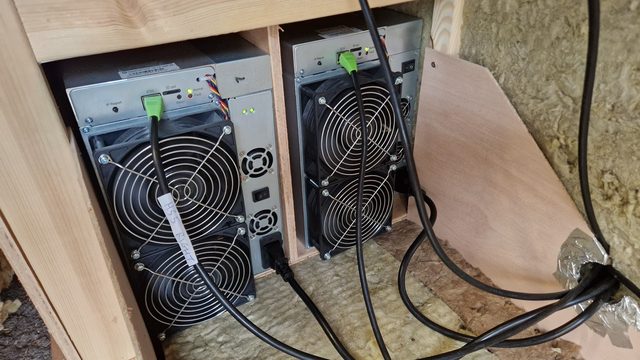
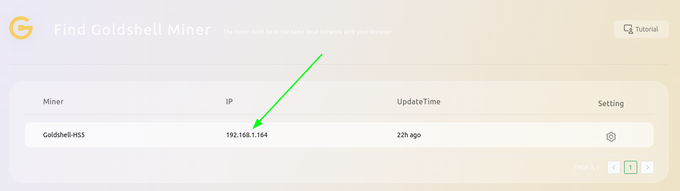
Never mined before? Pick your machine — every step has a photo from our own rigs. Click any image to enlarge.
admin / 123456789.
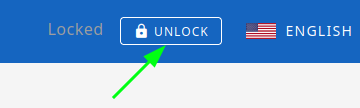
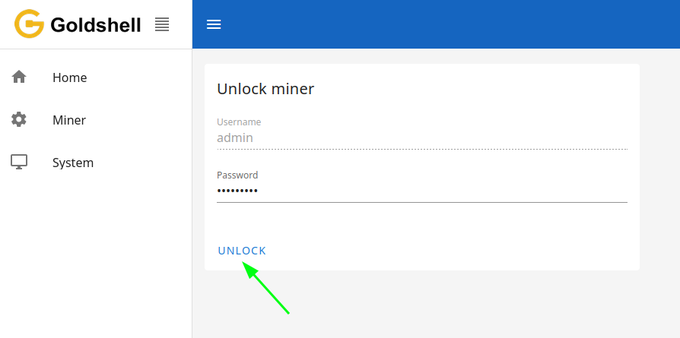
admin, password 123456789, then UNLOCK.x, then APPLY.
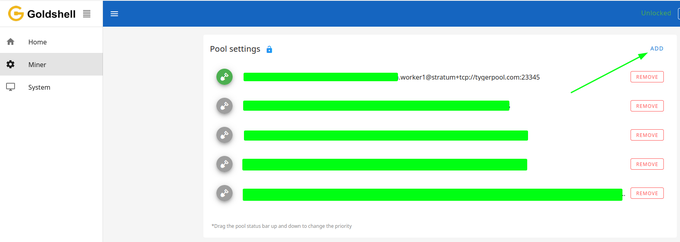
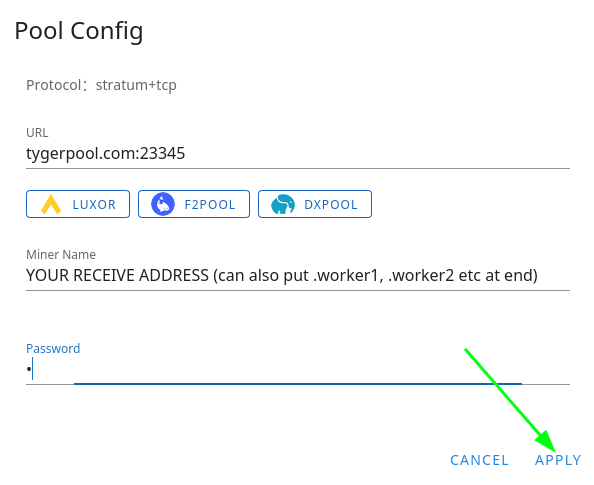
123456789; give it a few minutes. You can also reset it from hub.goldshell.com → Miner → More → Reset.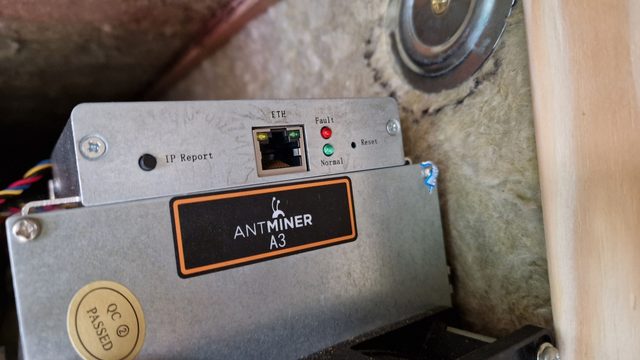
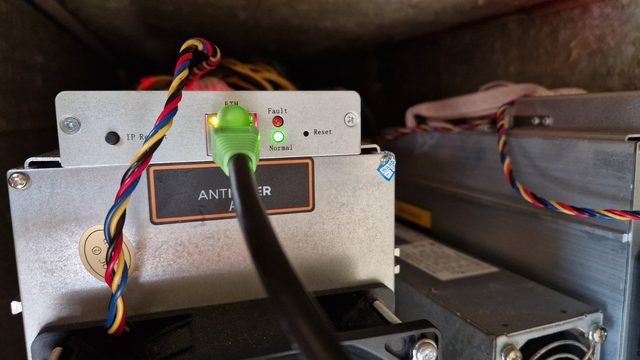
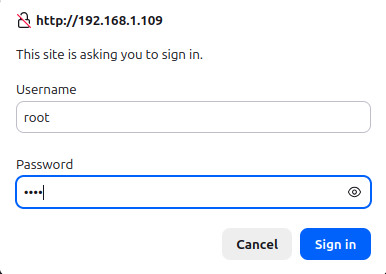
root / root.
root, password root.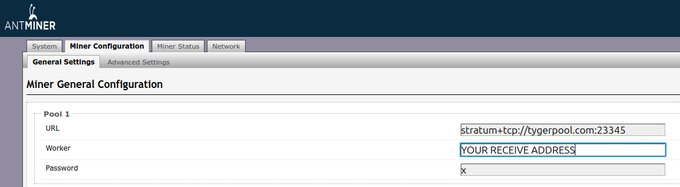
root / root, network back to DHCP — in a few minutes.Any Blake2b (Sia-style) miner works. Connection details are paused while
we move to DATUM — they'll be published with the new instructions. If your
machine wants an "algorithm" setting, it's blake2b. If it mines
but everything is rejected, your firmware may predate the fork's header
format — ask us before buying anything.
Wallet options for this chain are thin right now — that's the truth of a young fork. The safe route today is the chain's own full software — Bitcoin Knots run with this fork's consensus settings, set up per bitcoin-blake2b.org/mining: heavy (it downloads the chain), but it's the same code the network runs, and its wallet gives you an address that is yours alone. A lighter option is Shrike (github.com/privkeyio/shrike), a community fork of Sparrow Wallet built for this BLAKE2b chain — we haven't finished vetting it ourselves, so we won't formally recommend it yet, but it's a real project; when we have, this section will say so. Do not mine to an exchange address: most exchanges don't credit this chain, and coins sent to them may be gone.
Stuck? Click the 🐯 — instant answers. Prefer people? Discord → #getting-started.